Auto-tiling in Tiled with Smart Tiles and Wang sets
Edges are where tile maps go wrong: a wall needs the right corner, a lake the right shoreline piece on every side. Tiled MCP Pro has two engines that choose those pieces in code, so the AI only decides where each terrain goes. Both need the server in full mode.
Which engine to use
| Your tileset | Use | Setup |
|---|---|---|
| Has terrain (Wang) sets in Tiled | place_wang_terrain | None; it reads the Wang set. |
| No Wang sets, standard blob or 16-tile layout | Smart Tiles: define_autotile_rules + place_terrain | Map neighbour patterns to tiles once; saved in the tileset. |
| No Wang sets, and you want Tiled's own terrain brush too | Create a Wang set with add_terrain_set / set_terrain_tile, then place_wang_terrain | Assign Wang IDs to tiles once. |
Wang sets: place_wang_terrain
Pass a grid of terrain colors (1-based indices or color names, 0 or empty for "leave as is"), an origin, the layer, tileset and Wang set name. The tool computes the Wang ID of every cell from its neighbours, picks a matching tile, and with update_neighbors (the default) also re-picks the tiles around the edited area so the new terrain joins the old.
Call get_terrain_sets for "outdoor". Then on layer "Ground" use
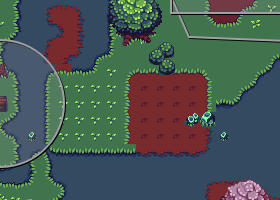
place_wang_terrain with set "Terrains" to paint a 6x4 grass bank
(Grass) at x=34, y=12, and a 5x4 Dirt field next to it.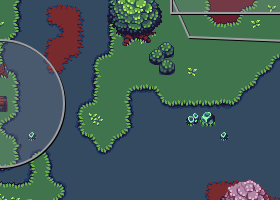 before
 after
orthogonal-outside example: a grass bank and a dirt field painted into the lake with place_wang_terrain. Shoreline tiles were chosen by the tool. Tileset: Michele "Buch" Bucelli, CC-BY 3.0.The result lists how many tiles were placed and updated. Cells where the tileset has no exact tile for the needed combination come back as approximate (closest tile used) or unmatched, with coordinates, so the AI can fix them by hand or change the plan.
Making a Wang set with the AI
If you want Tiled's terrain brush to work for you as well, have the AI build the Wang set: add_terrain_set (type corner, edge or mixed), add_terrain_color for each terrain, then set_terrain_tile to give each tile its Wang ID. Let it call get_tileset_preview first so it assigns IDs by looking at the tiles, and check the result in Tiled's terrain editor.
Smart Tiles: bitmask rules
Smart Tiles work with any tileset, Wang sets or not. You (or the AI, after looking at the preview) define rules once:
mode:blob47(8 directions, 47 states),simple16(4 directions, 16 states) orcustom.terrain_types: each terrain's name, a 1-2 character symbol for ASCII views, and a default tile.terrain_tiles: per terrain, bitmask to tile ID.tile_to_terrain: tile ID to terrain, used to read existing tiles back.
The rules are stored as a custom property on the tileset, so they are saved with it and survive restarts. get_autotile_rules reads them back.
Look at get_tileset_preview for "walls". Define simple16 autotile
rules: terrain "wall" (symbol #) and "floor" (symbol .), mapping each
4-direction bitmask to the matching wall piece.
Bitmask cheat sheet
For each cell, add the weight of every neighbour that has the same terrain:
| Neighbour | N | E | S | W | NE | SE | SW | NW |
|---|---|---|---|---|---|---|---|---|
| Weight | 1 | 2 | 4 | 8 | 16 | 32 | 64 | 128 |
- A diagonal only counts when both cardinal neighbours next to it match (NE needs N and E). That is what folds 256 combinations into 47 in
blob47. simple16ignores diagonals: values 0 to 15. 15 is a cell surrounded on all four sides; 0 is an isolated cell.- Examples: N+S = 5 is a vertical run; E+S+SE = 38 is a top-left corner piece in
blob47.
Painting with terrain names
place_terrain takes a grid of terrain names (empty string for no change). place_terrain_rect fills a rectangle. Both re-pick neighbouring tiles by default.
place_terrain_rect layer=Walls tileset=walls x=0 y=0 width=24 height=16 terrain=wall
place_terrain_rect layer=Walls tileset=walls x=1 y=1 width=22 height=14 terrain=floor
Two calls produce a walled room with correct corners; carving more rooms and corridors with floor updates the wall pieces around them.
Reading a map back as terrain
get_semantic_map (Smart Tiles) and get_wang_terrain_map (Wang sets) turn a layer back into terrain, so the model reasons about rooms and paths instead of tile IDs:
##########
#........#
#..~~~...#
#..~~~...#
####..####
   #..#
Limits and fixes
- A tileset can only show what it contains. If inner corners or T-junctions are missing, those cells come back approximate or unmatched; pick a fuller tileset or accept the closest tile.
- Corner-type Wang sets look at the three neighbours above and to the left of each cell's corners; edge and mixed sets look at all eight. Either way, paint whole areas rather than single cells for the cleanest result.
- Tiled's own AutoMapping rules are a separate system;
auto_mapruns the rules you already set up in Tiled.
Get Tiled MCP Pro
$10 once on itch.io, free updates.